IaaS Network Provider
English | 简体中文
Background
Terminology: ENI means Elastic Network Interface; Sub-ENI means Secondary Elastic Network Interface; VLAN means Virtual Local Area Network.
In public or private cloud environments, an IP address allocated by Spiderpool often needs to be registered, bound, or configured in the external cloud network system before the Pod can communicate. To support this, Spiderpool integrates with a generic IaaS Network Provider: an HTTP service implementing Spiderpool's generic API contract, tied to no specific cloud vendor. When Spiderpool allocates or releases a Pod IP, it calls the configured Provider to bind or unbind the corresponding sub-ENI resource on the cloud side.
This mode supports IPv4-only and IPv4/IPv6 dual-stack allocation (dual-stack pairs a v4 pool and a v6 pool via the ipam.spidernet.io/pair-pool annotation, with the paired addresses atomically bound to the same sub-ENI). IPv6-only is not supported yet.
Core capabilities:
- Allocate cloud sub-ENIs to Pods: call the Provider to create/bind a sub-ENI on the cloud platform, and configure the cloud-assigned MAC address and VLAN ID on the Pod's VLAN sub-interface via the eni-vlan CNI; release the cloud-side binding when the Pod is deleted.
- Two pool allocation modes: node prewarm pools (the Provider prewarms IPs per node, Pods start within seconds) and global pools (realtime allocation plus a sticky sub-ENI cache); see Container network configuration.
- Network resource scheduling: constrain Pod scheduling by per-node sub-ENI capacity (e.g.
spidernet.io/prewarm-sub-eni) and master physical NIC presence (spidernet.io/<master>-nic), so Pods never land on nodes without usable resources.
For design details — pool allocation mode internals, pool candidate class exclusivity, request timeouts and time budgets, and the Provider API contract — see IaaS Network Provider design.
Workflow
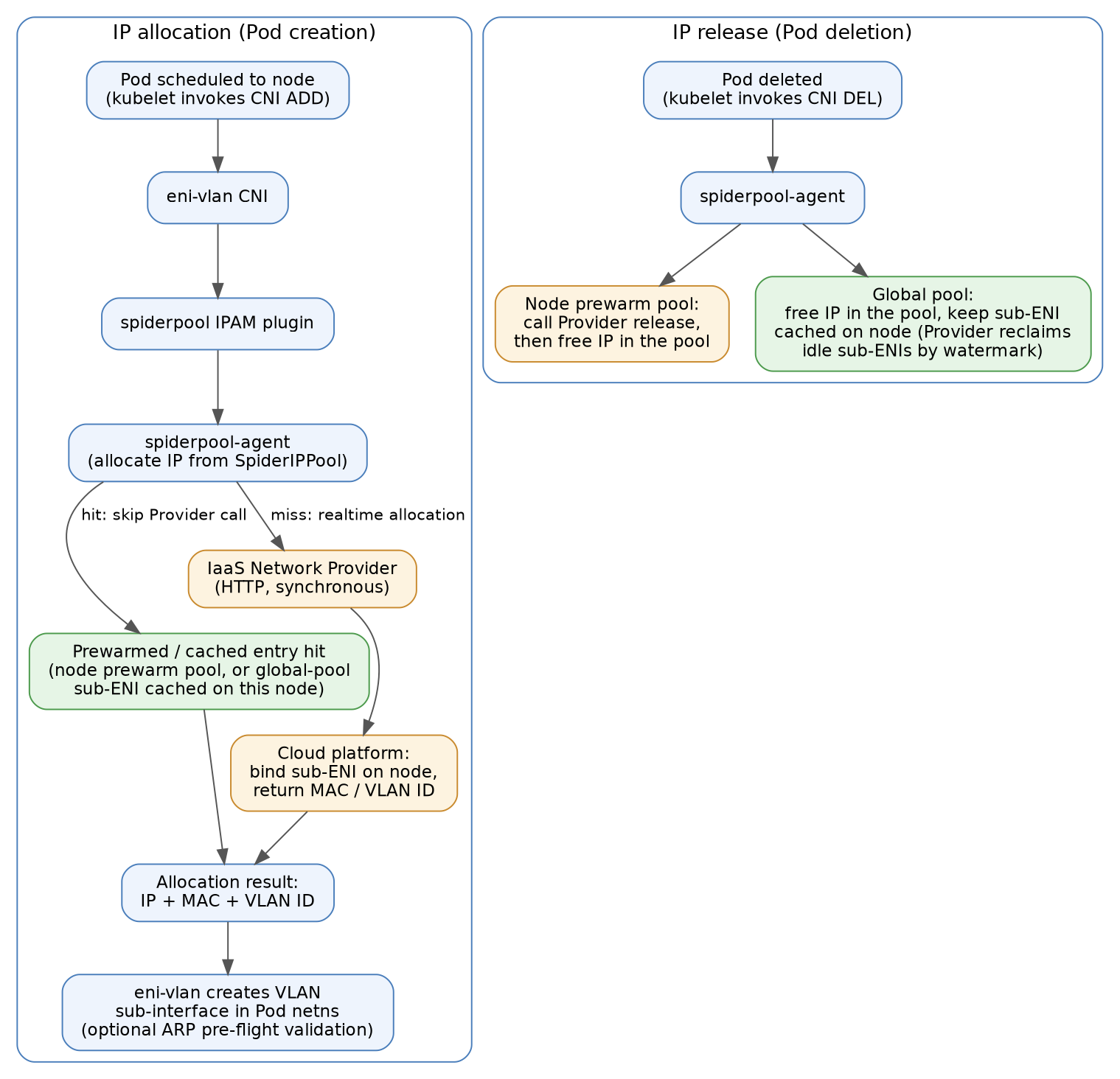
Allocation:
- After the Pod is scheduled to a node, kubelet issues CNI ADD; the eni-vlan CNI invokes the spiderpool IPAM plugin, which requests an IP from the local spiderpool-agent.
- The spiderpool-agent picks an address from the SpiderIPPool: on a prewarmed/cached entry hit (a ready address of a node prewarm pool, or a global-pool sub-ENI cached on this node), it reuses the entry's MAC/VLAN and skips the Provider call; otherwise it synchronously calls the Provider to bind a sub-ENI on the cloud side and fetch the MAC address and VLAN ID.
- IPAM returns IP + MAC + VLAN in the allocation result to eni-vlan, which creates the VLAN sub-interface in the Pod network namespace (with optional ARP pre-flight validation).
Release: when the Pod is deleted, an address from a node prewarm pool first triggers the Provider release API and is freed in the pool only after that succeeds (cloud side first, so the same IP is never reallocated before the cloud accepts the release); a global-pool address is only freed in the pool, while the cloud-side sub-ENI stays cached on the node and idle sub-ENIs are reclaimed by the Provider based on a watermark.
Installation and configuration
Prerequisites
- Install the IaaS Network Provider first: during Spiderpool install/upgrade, Helm looks up the Provider's TLS Secret and copies its
ca.crt, so the Provider must be installed before Spiderpool. - IaaS-side preparation:
- Create VPC subnets and bind them to node elastic NICs. For example, bind VPC subnet
172.91.0.0/24to the nodes' physical NICeth1. Thesubnetfield of the SpiderIPPools created later must match the VPC subnet. - Confirm the maximum number of secondary ENIs each node can bind, used to set the advertised
defaultMaxCount. - It is recommended that extension elastic NICs on nodes carry no IP addresses, to avoid communication issues caused by inconsistent return paths.
-
Node planning: label nodes into groups by purpose, using separate node groups for node prewarm pools and global pools, for example:
kubectl label node worker-1 worker-2 iaas-pool-mode=prewarm
kubectl label node worker-3 worker-4 iaas-pool-mode=global
The label can be used both by the resource advertisement rules'
nodeSelectorand by workloadnodeSelectors to pin prewarm-pool/global-pool workloads to the matching node group. * Consistent NIC names: the parent physical NIC (master) should carry the same name (e.g.eth1) on all candidate nodes; if that is not possible, enable master NIC name scheduling so workloads are never scheduled to nodes lacking the NIC. For more network resource scheduling capabilities, see Spiderpool Device Plugin.
Install Spiderpool
Prepare iaas-network-provider-values.yaml, covering Provider integration, eni-vlan plugin installation, and network resource scheduling in one go:
ipam:
  enableGatewayDetection: false
  enableIPConflictDetection: false
plugins:
  installEniVlanCNI: true
iaasNetworkProvider:
  service:
    name: "iaas-network-provider"
    namespace: "iaas-network-provider-system"
    port: 8443
  tls:
    caSecret: "iaas-network-provider-tls"
  httpRequestTimeout: "50s"
spiderpoolController:
  podResourceInject:
    enabled: true
spiderpoolAgent:
  networkResourcePlugin:
    enabled: true
    kubeletRootDir: /var/lib/kubelet
    resourceAdvertisement:
      masterNIC:
        rules:
          - defaultMaxCount: 10000
            includeInterfaces:
              - "eth1"
            nodeSelector:
              matchExpressions:
                - key: iaas-pool-mode
                  operator: In
                  values: ["prewarm", "global"]
      subENI:
        rules:
          - resourceName: spidernet.io/prewarm-sub-eni
            defaultMaxCount: 256
            nodeSelector:
              matchLabels:
                iaas-pool-mode: prewarm
          - resourceName: spidernet.io/global-sub-eni
            defaultMaxCount: 256
            nodeSelector:
              matchLabels:
                iaas-pool-mode: global
helm upgrade --install spiderpool spiderpool/spiderpool \
  --namespace kube-system \
  --values iaas-network-provider-values.yaml \
  --wait
Configuration notes:
iaasNetworkProvider.service: the Provider's Kubernetes Service (name/namespace/port). Ifservice.nameis empty, Spiderpool never calls the Provider. The connection uses one-way TLS: at install time Helm looks upiaasNetworkProvider.tls.caSecretinservice.namespaceand copies only itsca.crtinto the local Secretiaas-provider-ca. In GitOps orhelm templatescenarios (where lookup is unavailable), setiaasNetworkProvider.tls.ca(base64 PEM CA bundle) explicitly — it takes precedence over lookup;insecureSkipVerify=trueskips certificate verification and is intended only as a rollout fallback. If the Provider is reinstalled (generating a new CA), runhelm upgradeon Spiderpool again to refresh the CA snapshot.iaasNetworkProvider.httpRequestTimeout: timeout of a single Provider HTTP call (allocate or release), default50s. For value constraints and the full time budget model, see Request timeouts and time budgets.plugins.installEniVlanCNI: must betrue(defaultfalse) to install the eni-vlan CNI plugin on every node.ipam.enableGatewayDetection/ipam.enableIPConflictDetection: must be disabled. This mode calls IPAM first to obtain the IaaS IP information and only then lets the CNI set up Pod networking — the reverse of the traditional order — so gateway reachability and IP conflict detection cannot work at the IPAM stage; connectivity validation can instead be performed by eni-vlan before configuring the Pod IP (seevalidateIaasNetConfigin Container network configuration).spiderpoolAgent.networkResourcePlugin: enables Spiderpool Device Plugin resource advertisement. The rules in this example reuse theiaas-pool-modenode label applied in Prerequisites:subENIis split into two rules so the prewarm-pool and global-pool node groups advertise distinct resource names (spidernet.io/prewarm-sub-eniandspidernet.io/global-sub-eni), letting workloads of each mode declare their own resource without competing; themasterNICrule is shared by both node groups and advertisesspidernet.io/eth1-nic. Other nodes match no rule and are untouched.subENI.rules[].defaultMaxCountis the total secondary-ENI capacity a node exposes to the scheduler and should be set to each node's real capacity in production;masterNIC.rules[]selects physical NICs to advertise viaincludeInterfaces/excludeInterfacesglobs. See Spiderpool Device Plugin for field details and troubleshooting.spiderpoolController.podResourceInject.enabled: the webhook automatically injects thespidernet.io/<master>-nicresource into Pods referencing an eni-vlan SpiderMultusConfig. The sub-ENI resources are not auto-injected: users must declare them in Pod resources, otherwise the scheduler applies no ENI capacity constraint.
Verify the feature is enabled
-
Check the ConfigMap:
If the output includes
iaasNetworkProvider.service.namewith a non-empty value, the feature is enabled. -
Check agent startup logs:
kubectl logs spiderpool-agent-xxx -n kube-system | grep -E "IaaS client created successfully|IaaS provider configuration validation failed"IaaS client created successfullymeans the agent initialized the IaaS client;IaaS provider configuration validation failedmeans theiaasNetworkProvider.service/iaasNetworkProvider.tlsconfiguration needs fixing. -
Check node resource advertisement: confirm each node group labeled with
iaas-pool-modereports its own sub-ENI resource plus the shared master NIC resource:kubectl get nodes -o custom-columns='NAME:.metadata.name,POOL-MODE:.metadata.labels.iaas-pool-mode,PREWARM_SUB_ENI:.status.allocatable.spidernet\.io/prewarm-sub-eni,GLOBAL_SUB_ENI:.status.allocatable.spidernet\.io/global-sub-eni,MASTER_NIC:.status.allocatable.spidernet\.io/eth1-nic'Sample output (a two-node test cluster with one node in the prewarm group and one in the global group):
NAME       POOL-MODE   PREWARM_SUB_ENI   GLOBAL_SUB_ENI   MASTER_NIC
worker-1   prewarm     256               <none>           10k
worker-3   global      <none>            256              10k
Each node advertises only the sub-ENI resource of its own group. You can also inspect a node's
status.allocatabledirectly:kubectl get node worker-1 -o jsonpath='{.status.allocatable}' | jq 'with_entries(select(.key | startswith("spidernet")))'Nodes without the
iaas-pool-modelabel match no rule and show<none>for these resources. These allocatable resources are exactly what the Pod resources declared/injected in Create test applications are scheduled against.
Container network configuration
A SpiderIPPool is marked as IaaS-managed by the ipam.spidernet.io/iaas-provider: "<vendor>" annotation. <vendor> is a vendor identifier whose value is opaque to Spiderpool — only the annotation's presence matters; the mutating webhook automatically syncs a label of the same key so the Provider can watch pools by label selector.
IaaS pools have two modes, derived from the pool shape and immutable for the pool's lifetime (the validating webhook rejects adding or removing spec.nodeName on an existing IaaS pool):
| Mode | Shape | Behavior | parent-nic annotation |
|---|---|---|---|
| Node prewarm pool | spec.nodeName set (exactly one node) |
The Provider prewarms IPs on that node in advance; allocation uses ready addresses directly, skipping the synchronous Provider call | Required |
| Global pool | spec.nodeName absent |
Realtime allocation plus a sticky sub-ENI cache, serving workloads spread across nodes | Optional (when absent, the parent NIC is resolved from the SpiderMultusConfig master interface) |
ipam.spidernet.io/parent-nic names the single guest-OS parent NIC of the pool; the NIC must carry this name on every node the pool covers. Both pool kinds may be mixed as candidates for the same Pod interface: prewarm pools sort first and global pools serve as the fallback; IaaS pools must not be mixed with plain static pools (see Pool candidate class exclusivity). For dual-stack, create one v4 pool and one v6 pool and pair them with the ipam.spidernet.io/pair-pool annotation.
Each pool mode gets its own "IP pool + SpiderMultusConfig" set: the SpiderMultusConfig uses the eni-vlan CNI to create VLAN sub-interfaces for Pods, and declares the pools of that mode as default candidates via the ippools field, so workloads only need to reference the matching network configuration instead of selecting pools per Pod.
Node prewarm pool configuration
Create node prewarm pools
Create one pool per node:
apiVersion: spiderpool.spidernet.io/v2beta1
kind: SpiderIPPool
metadata:
  name: worker-1-pool
  annotations:
    ipam.spidernet.io/iaas-provider: "<vendor>"
    ipam.spidernet.io/parent-nic: eth1
spec:
  ipVersion: 4
  subnet: 172.91.0.0/24
  gateway: 172.91.0.1
  ips:
    - 172.91.0.100-172.91.0.119
  nodeName:
    - worker-1
---
apiVersion: spiderpool.spidernet.io/v2beta1
kind: SpiderIPPool
metadata:
  name: worker-2-pool
  annotations:
    ipam.spidernet.io/iaas-provider: "<vendor>"
    ipam.spidernet.io/parent-nic: eth1
spec:
  ipVersion: 4
  subnet: 172.91.0.0/24
  gateway: 172.91.0.1
  ips:
    - 172.91.0.120-172.91.0.139
  nodeName:
    - worker-2
After creation, observe the pool status to confirm prewarming has completed:
status:
  parentNic:          # resolved and published by the spiderpool-agent on the pool's node
    name: eth1
    mac: fa:16:3e:11:22:33
  ipMetaData:         # written by the Provider once prewarming completes
    observedGeneration: 1
    readyIPCount: 20  # number of prewarmed, ready addresses
    unreadyIPCount: 0
    metadata: '...'   # per-address MAC/VLAN metadata
  totalIPCount: 20
  allocatedIPCount: 0
A readyIPCount greater than 0 means prewarming has completed; only ready addresses are ever allocated to Pods.
Configure the prewarm-pool SpiderMultusConfig
Create an eni-vlan SpiderMultusConfig that references all node pools:
apiVersion: spiderpool.spidernet.io/v2beta1
kind: SpiderMultusConfig
metadata:
  name: iaas-prewarm-config
  namespace: spiderpool
spec:
  cniType: eni-vlan
  enivlan:
    master:
      - eth1
    ippools:
      ipv4:
        - worker-*-pool
    validateIaasNetConfig: true
    validationRetries: 3
    validationTimeoutMs: 500
Field notes:
master: the parent physical NIC name; it must exist on the target nodes and match the NIC selected bymasterNIC.rules[].includeInterfacesat install time (eth1in this example).ippools: default candidate pools. Since node pools are created per node, it is recommended to match them all at once with a wildcard (*,?, and[]are supported) —worker-*-poolin this example coversworker-1-pool,worker-2-pool, and so on, so adding a node pool requires no SpiderMultusConfig change; at allocation time IPAM automatically filters the candidates down to the pool matching the Pod's node.validateIaasNetConfig(defaultfalse): enables ARP pre-flight validation. Before configuring the Pod IP, eni-vlan probes the gateway via ARP using the real cloud-assigned IP/MAC to validate the IP/VLAN/MAC triple, failing closed on validation failure — replacing the disabled IPAM-stage gateway detection.validationRetries(default3) /validationTimeoutMs(default500): retry count and per-attempt timeout (milliseconds) of the pre-flight validation.
The eni-vlan CNI has no
vlanIDconfiguration field: the VLAN ID and MAC address are dynamically allocated by the IaaS Network Provider and delivered through the spiderpool IPAM plugin in the allocation result. Do not use the community staticvlanCNI with IaaS pools: its staticvlanIDsemantics conflict with dynamic cloud-side VLAN allocation, and Spiderpool rejects that combination.
Global pool configuration
Create a global pool
Same iaas-provider annotation, but without spec.nodeName:
apiVersion: spiderpool.spidernet.io/v2beta1
kind: SpiderIPPool
metadata:
  name: app-global-pool
  annotations:
    ipam.spidernet.io/iaas-provider: "<vendor>"
    ipam.spidernet.io/parent-nic: eth1
spec:
  ipVersion: 4
  subnet: 172.92.0.0/24
  gateway: 172.92.0.1
  ips:
    - 172.92.0.100-172.92.0.200
Global pools need no prewarming: the first Pod landing on a node triggers a synchronous Provider call to create/attach a sub-ENI; after the Pod is deleted, the sub-ENI stays cached on the node so subsequent Pods on that node hit the cache. Reclaiming idle sub-ENIs is the Provider's responsibility, based on a watermark (see the design document for the reclaim race guard).
Configure the global-pool SpiderMultusConfig
Create a separate SpiderMultusConfig for the global pool. The fields have the same meaning as in the prewarm-pool configuration; only ippools differs, referencing the global pool directly:
apiVersion: spiderpool.spidernet.io/v2beta1
kind: SpiderMultusConfig
metadata:
  name: iaas-global-config
  namespace: spiderpool
spec:
  cniType: eni-vlan
  enivlan:
    master:
      - eth1
    ippools:
      ipv4:
        - app-global-pool
    validateIaasNetConfig: true
    validationRetries: 3
    validationTimeoutMs: 500
Create test applications
Regardless of the pool mode, workloads should explicitly declare their group's sub-ENI resource (spidernet.io/prewarm-sub-eni for the prewarm group, spidernet.io/global-sub-eni for the global group) so the scheduler constrains placement by per-node ENI capacity; spidernet.io/<master>-nic (spidernet.io/eth1-nic in this example) is injected automatically by the webhook and needs no declaration. The candidate pools are already provided by each mode's SpiderMultusConfig ippools; to override them for an individual workload, use the ipam.spidernet.io/ippool Pod annotation.
Node prewarm pool mode
Reference the prewarm-pool network configuration iaas-prewarm-config and pin the workload to the prewarm node group via nodeSelector; Spiderpool automatically filters the candidates down to the node pool matching the Pod's node:
apiVersion: apps/v1
kind: Deployment
metadata:
  name: prewarm-app
spec:
  replicas: 2
  selector:
    matchLabels:
      app: prewarm-app
  template:
    metadata:
      labels:
        app: prewarm-app
      annotations:
        k8s.v1.cni.cncf.io/networks: spiderpool/iaas-prewarm-config
    spec:
      nodeSelector:
        iaas-pool-mode: prewarm
      containers:
        - name: demo
          image: busybox:1.36
          command: ["sh", "-c", "sleep 3600"]
          resources:
            requests:
              spidernet.io/prewarm-sub-eni: "1"
            limits:
              spidernet.io/prewarm-sub-eni: "1"
Verification: Pods should be Running within seconds (allocation hits prewarmed addresses without a synchronous Provider call), with IPs coming from the pool matching each Pod's node:
kubectl get pod -l app=prewarm-app -o wide
kubectl get spiderippool worker-1-pool worker-2-pool -o custom-columns='NAME:.metadata.name,ALLOCATED:.status.allocatedIPCount'
Global pool mode
Pin to the global node group and reference the global-pool network configuration iaas-global-config:
apiVersion: apps/v1
kind: Deployment
metadata:
  name: global-app
spec:
  replicas: 3
  selector:
    matchLabels:
      app: global-app
  template:
    metadata:
      labels:
        app: global-app
      annotations:
        k8s.v1.cni.cncf.io/networks: spiderpool/iaas-global-config
    spec:
      nodeSelector:
        iaas-pool-mode: global
      containers:
        - name: demo
          image: busybox:1.36
          command: ["sh", "-c", "sleep 3600"]
          resources:
            requests:
              spidernet.io/global-sub-eni: "1"
            limits:
              spidernet.io/global-sub-eni: "1"
Verification: replicas on different nodes all obtain IPs from app-global-pool; if a recreated replica lands on the same node, it hits the node's cached sub-ENI and starts quickly:
kubectl get pod -l app=global-app -o wide
kubectl get spiderippool app-global-pool -o custom-columns='NAME:.metadata.name,ALLOCATED:.status.allocatedIPCount'
Connectivity and scheduling verification
-
Gateway connectivity: ping the pool's gateway from inside the Pod to confirm the cloud-assigned IP/MAC/VLAN configuration is correct and the VLAN sub-interface communicates properly:
-
Scheduling constraints: confirm both the user-declared sub-ENI request and the webhook-injected master NIC resource took effect:
The expected output contains both
"spidernet.io/prewarm-sub-eni":"1"("spidernet.io/global-sub-eni":"1"in global pool mode) and"spidernet.io/eth1-nic":"1". When total requests exceed node capacity, excess Pods stayPendingwithFailedSchedulingevents showingInsufficient spidernet.io/prewarm-sub-eni(orglobal-sub-eni/eth1-nic). -
Troubleshooting:
<master>-nicnot injected into the Pod: checkpodResourceInject.enabledand whether the Pod references the eni-vlan SpiderMultusConfig.- No matching sub-ENI resource/
<master>-nicin node allocatable: check thenetworkResourcePluginrules,nodeSelector, andincludeInterfaces, and runip link showon the target node to confirm themasterNIC exists. - Allocation failures: inspect Provider call errors in the spiderpool-agent logs; for timeout error semantics, see Request timeouts and time budgets.
Abnormal scenario handling
Spiderpool treats the following as failures:
- The HTTP request fails.
- The HTTP response status code is not
2xx. - The allocation response JSON cannot be parsed.
- The allocation response contains IPs that Spiderpool did not request.
When a release fails, Spiderpool may retry it in subsequent cleanup flows depending on the path that triggered the release. The Provider's release API must therefore support idempotent retries.
For Provider-side implementation requirements (synchronous allocation success, idempotent release, eventually-consistent release, tolerance of a missing parent NIC MAC) and the full API contract, see IaaS Network Provider design.